JBoss AS7 with Apache + SSL

Why would you want to do this?

After years of having my users connect natively to JBoss application servers in production I have had a few little issues that nagged at me. One of the biggest is that there is not a way to show a custom error page to my users when the JBoss server is down. Second is that I try and limit as much as I can specific configuration details that go into the server configuration so that upgrading between minor releases does not require a lot of configuration editing. Setting up SSL certificates and modifying the default server ports qualifies as hacking up the standard configuration in my book so that is something I would like to limit/avoid.

The Goal

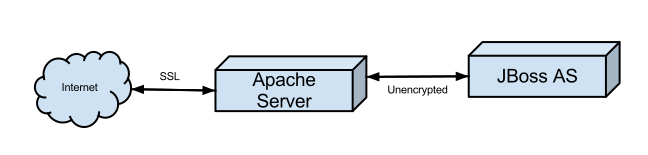
What we are ultimately trying to do is have an Apache web server handle all the communication between the user and our system. This communication will be secured via SSL. The apache server however has no real content so it will "proxy" the requests to our JBoss application server. The application server will be as simple as possible and will not run SSL.

Other details

  • Our project is named foo

  • Requests come to https://foo.outjected.com and we don’t want to have our users go to https://foo.outjected.com/foo/ so our web-app context root is going to be "/"

  • We will redirect you to https://foo.outjected.com if you happen to browse to the non-secure http://foo.outjected.com

  • We are going to configure the JBoss server with a virtual host so it can support more than one app if needed.

  • We want to serve our own error page if the JBoss server cannot process our request due to being down.

apache_to_jboss_as

This little example is going to be using Ubuntu 12.04.1 LTS and JBoss AS 7.1.3.Final but should be compatible with similar setups.

Let’s do it.

I’m going to assume you have a bare bones Apache 2+ server and JBoss AS7 server setup. If you don’t then search around for some guides. This blog is interested in how to pair them, not the basic setup of each. You should also have a working application and some basic knowledge of how to deploy on AS7. This isn’t meant to be a soup to nuts guide for building and deploying your application.

Apache Prep

First create a new directory for our non-proxy (error pages) content /var/www/foo.outjected.com

Go ahead and create a simple error page at /var/www/foo.outjected.com/errors/503.html. This is the page that will be served if the app server is down.

Run the following commands to enable the needed modules in apache

a2enmod proxy
a2enmod proxy_ajp
a2enmod ssl

Next go into /etc/apache2/sites-available and create a new file foo.outjected.com+. For this example I’m using a single server so the server I’m proxying to is localhost Your config may/will/should vary.

          <VirtualHost *:80>
              ServerName foo.outjected.com
              Redirect / https://foo.outjected.com
          </VirtualHost>
          
          <VirtualHost *:443>
              SSLEngine on
              SSLCertificateFile /etc/apache2/ssl/foo.outjected.com.pem
              ServerName foo.outjected.com
              ProxyRequests Off
              ProxyPreserveHost On
              ProxyPassReverseCookiePath / /
              ProxyPass /errors/ !
              ProxyPass / ajp://localhost:8009/
              ProxyPassReverse / ajp://localhost:8009/
              ErrorDocument 503 /errors/503.html
              DocumentRoot /var/www/foo.outjected.com
              ErrorLog /var/log/apache2/foo.outjected.com_errors.log
          </VirtualHost>

Now enable the site.

a2ensite foo.outjected.com

If you restart apache you should now see your 503 page as our JBoss server isn’t setup yet.

Setting up the JBoss Server

My JBoss AS7 install is at /usr/local/jboss so adjust your paths as necessary.

Edit /usr/local/jboss/standalone/configuration/standalone.xml and make these two modifications under the web subsystem

# Add the ajp connector # Add a virtual-server entry for foo.outjected.com

Should look something like this.

<subsystem xmlns="urn:jboss:domain:web:1.2" default-virtual-server="default-host" native="false">
              <connector name="http" protocol="HTTP/1.1" scheme="http" socket-binding="http"/>
              <connector name="ajp" protocol="AJP/1.3" scheme="http" socket-binding="ajp" enabled="true"/>
              <virtual-server name="default-host" enable-welcome-root="true">
                  <alias name="localhost"/>
                  <alias name="example.com"/>
              </virtual-server>
              <virtual-server name="foo" enable-welcome-root="false" default-web-module="foo">
                  <alias name="foo.example.com"/>
              </virtual-server>
          </subsystem>

Your EAR/WAR is going to need a jboss-web.xml (foo.war/WEB-INF/jboss-web.xml) which will define the virtual host and set the context root

<?xml version="1.0"?>
          <!DOCTYPE jboss-web PUBLIC "-//JBoss//DTD Web Application 5.0//EN" "http://www.jboss.org/j2ee/dtd/jboss-web_5_0.dtd">
          <jboss-web>
              <context-root>/</context-root>
              <virtual-host>foo</virtual-host>
          </jboss-web>

Start up your JBoss server as normal and enjoy your new proxied setup.

Cody Lerum - December 13, 2012

CDI and JSF aren't Best Friends Yet

Where I started banging my head into the table.

This specific issue has actually has jumped up and bit me a few times so I’ll just try explain the most recent one. Basically I have a new object that I am creating through a JSF form page, and that object needs to have a default value set at creation which is determined at runtime. For the sake of exposing this little issue lets assume that this value needs to be used multiple times during the request and thus we will make the producer @RequestScoped to avoid duplicate database calls.

To the code!

@ConversationScoped
          @Named
          public class CarPricerManager implements Serializable {
          
              private static final long serialVersionUID = 1L;
          
              @Inject
              @Active
              private PriceBook activePriceBook;
          
              private CarPricer carPricer;
          
              public CarPricer getCarPricer() {
                  if(carPricer == null) {
          
                      carPricer = new CarPricer();
                      carPricer.setPriceBook(activePriceBook);
                  }
                  return carPricer;
              }
          }
          
          public class PriceBooks {
          
              @Produces
              @RequestScoped
              @Active
              public PriceBook findActivePriceBook() {
                  return em.createQuery(.....).getSingleResult();
              }
          
              @Produces
              @RequestScoped
              @Named
              public List<PriceBook> priceBooks() {
                  return em.createQuery(.....).getResultList();
              }
          }

Now lets show the JSF snippet to select our price book when creating our new CarPricer

<h:selectOneMenu value="\#{carPricerManager.carPricer.priceBook}" required="true"
              converter="PriceBookConverter">
              <f:selectItem itemLabel="Choose" />
              <f:selectItems value="\#{priceBooks}" var="_apb" itemLabel="\#{_apb.name}" />
          </h:selectOneMenu>

Where it goes wrong.

What we would expect to happen is the selectOneMenu would initially be selected with the value of our active price book. However this isn’t going to be the case because the injection of our active price book does not give us an object of PriceBook.java it gives us an proxy of PriceBook.java and the equals(…) that JSF is going to call will not return true.

Why it goes wrong.

The CDI EG has determined that there is not meaningful way to implement .equals() and .hashCode() on a proxy that can delegate to the underlying bean (See OWB-458 & WELD-695). What this means is that two proxies of the same underlying bean will be equal. However, two proxies to underlying beans which are equal according to .equals will not be equal.

(How can we fix this?*

One solution would be to execute the .equals() on the converted value if a converter exists. However, the JSF RI Mojarra feels (JAVASERVERFACES-2393) that any proxy must should delegate equals, hashCode and toString to the proxied instance per java.lang.reflect.Proxy. In the case of CDI the underlying bean can change during the lifecycle of the proxy and thus delegating isn’t realistic. This appears to be one of those places where the JSF and CDI expert groups need to step in and find a solution so that developers can enjoy consistent and predictable behavior in their applications.

A solutions that work now.

By making the bean with the producers @RequestScoped and storing the values in the bean after initial population we can have default dependent scoped producers which don’t produce proxies and hit the database only once.

@RequestScoped
          public class PriceBooks {
          
              private PriceBook activeBook;
              private List<PriceBook> books;
          
              @Produces
              @Active
              public PriceBook findActivePriceBook() {
              if (activeBook == null)
                  activeBook = em.createQuery(.....).getSingleResult();
                  return activeBook;
              }
          
              @Produces
              @Named
              public List<PriceBook> priceBooks() {
              if (books == null) {
                  books = em.createQuery(.....).getResultList();
                  return books;
              }
          }
tags: cdi jsf java
Cody Lerum - September 11, 2012

Seam Mail 3.1.1.Final Released

Obligatory Links and Compatibility

I’m happy to announce that I’ve released a minor update to Seam 3 Mail versioned 3.1.1.Final. This is a minor release which is compatible with Seam 3.1.0.Final.

Whats new?

The main goal of this release was to fill in some gaps in documentation as well as some minor bug fixes which popped up since the 3.1.0.Final release. I’ve also added in a utility class called MessageConverter which allows you to read a MimeMessage back into the internal EmailMessage object used by Seam Mail. This opens up the option for Seam Mail to receive messages in addition to sending them. Check out Closed Issues on the JIRA tracker for details.

What does future look like?

Seam 3 Mail will continue to provide releases in its current format until the time comes for it to transition to Apache DeltaSpike. In the meantime if you have features for fixes to contribute just open a JIRA and I’ll be happy to work them in.

How about an example?

POP3+SSL to receive an MimeMessage and convert it. It’s basically for gmail but with values changed to protect the innocent.

import java.util.Properties;
          
          import javax.mail.Folder;
          import javax.mail.Message;
          import javax.mail.Session;
          import javax.mail.Store;
          import javax.mail.URLName;
          
          import org.jboss.seam.mail.core.EmailMessage;
          import org.jboss.seam.mail.util.MessageConverter;
          
          import com.sun.mail.pop3.POP3SSLStore;
          
          public class Popper {
          
              public static void main(String[] args) throws Exception {
          
                  String SSL_FACTORY = "javax.net.ssl.SSLSocketFactory";
          
                  Properties pop3Props = new Properties();
          
                   pop3Props.setProperty("mail.pop3.socketFactory.class", SSL_FACTORY);
                   pop3Props.setProperty("mail.pop3.socketFactory.fallback", "false");
                   pop3Props.setProperty("mail.pop3.port", "995");
                   pop3Props.setProperty("mail.pop3.socketFactory.port", "995");
          
                   URLName url = new URLName("pop3", "pop.example.com", 995, "", "foo@example.com", "mypass");
          
                   Session session = Session.getInstance(pop3Props, null);
                   Store store = new POP3SSLStore(session, url);
                   store.connect();
          
                   Folder inbox = store.getFolder("INBOX");
                   inbox.open(Folder.READ_ONLY);
          
                   Message[] messages = inbox.getMessages();
          
                   if (messages.length == 0) {
                       System.out.println("No Messages Found");
                   }
          
                   List<EmailMessage> emailMessages = new ArrayList<EmailMessage>();
          
                   for (Message m : messages) {
                       emailMessages.add(MessageConverter.convert(m));
                   }
          
                   inbox.close(false);
                   store.close();
              }
          }
tags: java seam email
Cody Lerum - July 15, 2012

Sending Queued Mail with Seam Mail

The Problem

One of the more common questions that I see by users coming to "Seam 3 Mail":http://www.seamframework.org/Seam3/MailModule is about sending email asynchronously like was possible in "Seam 2":http://docs.jboss.org/seam/2.2.2.Final/reference/en-US/html_single/#d0e21609. This usually stems from "slowness" problems that arise when sending mail through an interactive application. The problem is that when your "user" submits that order for his fancy new widgets, the confirmation email sent is using the same thread that handled the processing of the web page. Thus the user is left with their browser in a blocked "loading" state thinking your application is slow when in reality it’s the mail server that is taking its sweet time.

The Knee-jerk Reaction

A lot of people will see this blocked thread and think the solution is to fire the email asynchronously. This way the email with be dispatched via separate thread and control will be instantly returned to the user . However the problem with asynchronous methods is that they are fire and forget. If an exception occurs during the send process, then the email is lost and there is no notification that it failed. Realistically, outside of a demo application you generally want some guarantee that the email was, or will be sent as having all those order confirmation emails silently lost will not be pretty.

You Really Want

What is needed is a system which allows you to send email from your application without blocking the execution on the current thread, while at the same time providing a guarantee that the email will be reliably sent (at least from your application to your "SMTP":http://en.wikipedia.org/wiki/Simple_Mail_Transfer_Protocol server).

The Solution

Seam Mail provides a way to replace out the default "send" implementation with one of your own via the "MailTransporter":https://github.com/seam/mail/blob/develop/api/src/main/java/org/jboss/seam/mail/core/MailTransporter.java interface. That way when you call @msg.send()@ you can control how and when the email is "sent". What follows is a basic implementation.

In the code that follows I’m skipping the import statements for the sake of readability, but everything is standard EE6 + Seam 3 with exception of the Files which comes from Google Guava.

The default MailTransporterImpl is very simple and looks as follows.

public class MailTransporterImpl implements MailTransporter {
          
              private Session session;
          
              public MailTransporterImpl(Session session) {
                  this.session = session;
              }
          
              public EmailMessage send(EmailMessage emailMessage) {
                  MailUtility.send(emailMessage, session);
                  return emailMessage;
              }
          }

The MailUtility.send(emailMessage, session) sends the email using the configured javax.mail.Session. This is a blocking implementation and will not release the thread until the destination mail server has acknowledged receipt of the message. This might take a couple milliseconds or a few minutes depending on message size, server performance and network bandwidth. If this doesn’t work for you then it’s easy to swap out.

First lets create a new MailTransporter called MailQueueTransporter

public class MailQueueTransporter implements Serializable, MailTransporter {
          
              private static final long serialVersionUID = 1L;
          
              @Inject
              @QueuedEmail
              private Event<MimeMessage> queueEvent;
          
              @Inject
              @ExtensionManaged
              private Instance<Session> session;
          
              @Override
              public EmailMessage send(EmailMessage emailMessage) {
          
                  MimeMessage msg = MailUtility.createMimeMessage(emailMessage, session.get());
                  queueEvent.fire(msg);
          
                  return emailMessage;
              }
          }

Starting from the top we see that we are injecting a new Event qualified with @QueuedMail and typed to MimeMessage. @QueuedMail is a simple qualifier, and if you have never written one before here is what it looks like.

@Qualifier
          @Target({ ElementType.TYPE, ElementType.METHOD, ElementType.PARAMETER, ElementType.FIELD })
          @Retention(RetentionPolicy.RUNTIME)
          public @interface QueuedEmail { }

Next we inject the javax.mail.Session as managed by Seam Mail and implement the public EmailMessage send(EmailMessage emailMessage) as mandated by the interface. Inside this method we use the Seam MailUtility class to convert our EmailMessage as built by Seam Mail to a standard MimeMessage and then fire it as a CDI event.

A CDI event however is still blocking in its execution so lets see what is observing this event.

public class MailQueueReceiver {
          
              @Inject
              private Logger log;
          
              public static final String mailQueueFolder = "/var/data/mailQueue/";
          
              public void receiveMessage(@Observes @QueuedEmail MimeMessage msg) {
                  log.debugf("Writing queued message to disk");
                  OutputStream os;
                  try {
                      os = Files.newOutputStreamSupplier(
                        new File(mailQueueFolder + UUID.randomUUID())).getOutput();
                      msg.writeTo(os);
                      os.close();
                  } catch (IOException e) {
                      throw new SendFailedException("Failed to Write Message to Queue", e);
                  } catch (MessagingException e) {
                      throw new SendFailedException(e);
                  }
              }
          }

What we have done here is to receive the CDI event and immediately write the message to persistent storage, in this case to a queue folder on the application server. Now our thread is returned as fast as we can write the message to disk. You could also write these bytes out to the database or a in memory store if the loss of queued email during a server shutdown/crash is not an issue.

All that is needed now is a process to send these stored messages. I’m using a EJB 3.1 scheduled timer, but the options are endless.

@Singleton
          public class MailQueueSender {
          
              @Inject
              private Logger log;
          
              @Inject
              @ExtensionManaged
              private Session session;
          
              private String mailQueueFolder;
          
              @PostConstruct
              public void postConstruct() {
                  mailQueueFolder = MailQueueReceiver.mailQueueFolder;
                  File queueFolder = new File(mailQueueFolder);
                  session.getProperties().put("mail.smtp.connectiontimeout", 15000);
                  session.getProperties().put("mail.smtp.timeout", 15000);
                  log.infof("Initialized Mail Queue with %s messages in queue", queueFolder.listFiles().length);
              }
          
              @Schedule(second = "15,45", minute = "*", hour = "*", persistent = false)
              public void sendQueue() throws InterruptedException {
          
                  File queueFolder = new File(mailQueueFolder);
                  LinkedList<File> files = new LinkedList<File>(Arrays.asList(queueFolder.listFiles()));
          
                  while (!files.isEmpty()) {
                      File file = files.peek();
                      InputStream is;
                      try {
                          is = Files.newInputStreamSupplier(file).getInput();
                          RootMimeMessage msg = new RootMimeMessage(session, is);
                          msg.setMessageId(generateMessageId());
                          Transport.send(msg);
                          log.debug("Sent Mail Message: " + msg.getMessageID());
                          is.close();
                          files.pop();
                          file.delete();
                      }
                      catch (IOException e) {
                          throw new SendFailedException("Failed to read message from Disk: " + file.getName(), e);
                      }
                      catch (MessagingException e) {
                          throw new SendFailedException("Send Failed for Message: " + file.getName(), e);
                      }
                  }
              }
          
              private String generateMessageId() {
                  String mailerDomainName = session.getProperty("mail.seam.domainName");
                  if (mailerDomainName != null && mailerDomainName.length() > 0) {
                      return UUID.randomUUID().toString() + "@" + mailerDomainName;
                  }
                  else {
                      return UUID.randomUUID().toString() + "@" + MailUtility.getHostName();
                  }
              }
          }

One thing to note is that you have to reset the javax.mail.Session as that is lost when the MimeMessage is converted to a OutputStream. There is a little added complexity going on here as I like to control the domain part of a Message-ID, but this is a simple reliable way to handle sending mail in a fast and reliable fashion.

tags: java seam email
Cody Lerum - July 07, 2012

Fighting with JSF Request charset: JBoss or Tomcat

After just spending a good amount of time troubleshooting an issue with character encoding in JSF + JBoss AS7 I thought I would throw up a few notes on the subject as there are lots of scattered bits floating around but no real clear explanation. Hopefully this does more than contribute to the scattered bits :-)

First lets start off with a little background on how servers and clients determine how to encode data for transfer

  • Server response to Client:

    • Server Encode: When a server is sending a response to a client with JSF it encodes the response based on the defined encoding of the file which is usually set at the top of a JSF XHTML file <?xml version="1.0" encoding="UTF-8"?> The server will also include a Content-Type in the response header sent to the client.

    • Client Decode: When the client receives a response it checks the Content-Type defined in the response headers to decide which charset to use for decode. However If the Content-Type is not listed in the response header then the client may check the page meta tags for a hint or default to ISO-8955-1

  • Client Request (POST) to Server:

    • Client Encode: The client will encode it’s request based on the encoding of the response it received from the server.

    • Server Decode: This is where things get a little tricky.

      • The request received from the client will likely lack any hint as to how things were encoded.

        • It may have a Accept-Charset defined, but that is simply informing the server which charset’s are valid for it’s response encoding.

        • It will also have a Content-Type which reflects the enctype set on the form element submitting this post. By default it is application/x-www-form-urlencoded. Notice no reference to the charset this request was encoded in.

        • Some requests like ajax requests will look like this application/x-www-form-urlencoded;charset=utf-8; This does work and Tomcat/JbossWeb will decode as utf-8 but I have not figured out how to force this on a non-ajax h:form

      • The catch here is that if there is not a charset defined in the request Content-Type then the request parameters will be decoded using ISO-8859-1.

So you’ve configured for pages for UTF-8 and ensured that your server responses are including a charset in the Content-Type. Everything is great until you submit the form and your UTF-8 encoded client request is decoded as ISO-8859-1. Depending on the data your users submit you may not even notice this in your app for weeks/months/years/never. But for example if user may submit something like I’m and you will get I’m

Once you accept that this is how things work, there is an easy way to fix this by adding the following snippet to your web.xml

<web-app>
            ...
          
              <filter>
                <filter-name>forceUTF8CharSet</filter-name>
                <filter-class>org.apache.catalina.filters.SetCharacterEncodingFilter</filter-class>
                <init-param>
                  <param-name>encoding</param-name>
                  <param-value>utf-8</param-value>
                </init-param>
              </filter>
          
              <filter-mapping>
                <filter-name>forceUTF8CharSet</filter-name>
                <url-pattern>*</url-pattern>
              </filter-mapping>
            ...
          </web-app>

This filter currently is in Tomcat 7.0.20 and up. If you are running JBoss 7 you can just grab the class from Github import it into your project. I’ve opened JBWEB-225 with JBoss Web to have this filter added.

tags: java jsf jboss
Cody Lerum - January 18, 2012
1 2 3
About outjected.com

Outjected is an infrequent blog about the frequent issues and annoyances that pop up while coding.

These are living posts and will be updated as errors or improvements are found.
About Me
Google+